Monday, October 13, 2014

Snapchat isn't private. Period.

Snapchat isn't private. Period. 
The Snapchat photo-sharing app offers a false send of privacy by promising it will erase photos.
Read more here: http://www.wcvb.com/money/snapchat-isnt-private-period/29057302#ixzz3G3YEVyGt

Just another reason for students to realize that whatever they put on the internet is never private!   Last spring Adam McLane posted Why You Should Delete SnapChat,  This should make for an interesting lesson this month.

Friday, September 26, 2014

Digital Footprint - Freshmen Presentation

Today I had the opportunity to speak to the entire freshmen class about their Digital Footprint. The purpose of the presentation was to address The Good, the Bad and the Ugly of using social media. I started the presentation with focusing on all of the good things Nashoba is doing online.  I highlighted the our Athletic Director @nashobaAD and school newspaper The Chieftain Press @Chieftain_Chat.  I then moved on "The Bad" and talked about our unpleasant experience with Yik Yak last week but show the positive tweets that were sent out to show that does not represent our school.  Lastly I moved on the "The Ugly" discussing Sexting and other bad choices that students sometimes make.  I wanted to make sure students were aware of the consequences of their actions.  Our school resource officer addressed the students along with a representative for the Worcester DA's office.  When preparing for the presentation I struggled.  I didn't want to lecture on the evil of social media.  I use social media as an educator and wanted students to see the value of contributing to the Nashoba Community.  At the same time, I wanted to make they realized there are legal consequences for bad choices.  The students were a great audience and hopefully the presentation gave them something to think about.  Here is the link to Prezi Presentation  and published below.


Tuesday, September 23, 2014

How to Create a Captivating Presentation (Science and English Interdisciplinary Course)

Interdisciplinary Course with Science Teacher Mrs. Doyle and English Teacher Ms. Rocha

Lesson 1 with Mrs. Doyle
- Trading Card for an influential person
- Introduce Google Classroom for collecting pdf files

Present to class on presentation techniques and tools.
Getting Students to create an engaging presentation and show creativity can be a difficult task.  It's easy to put all the words on a slide and read the slide to the class but it's not very engaging! Here are some tips and a blog post to help prepare for your presentation:
1. Tap your enthusiasm
2. Get to the core of your message.
3. Tell a captivating story.
4. Wow them with words.
5. Create stunning slides.
6. Keep it simple.

There are several tools that you can use to create an interesting presentation.
  • Google Presentation (incorporating YouTube Videos into the presentation
  • Prezi
  • SlideShare
  • Infographics (example http://piktochart.com)
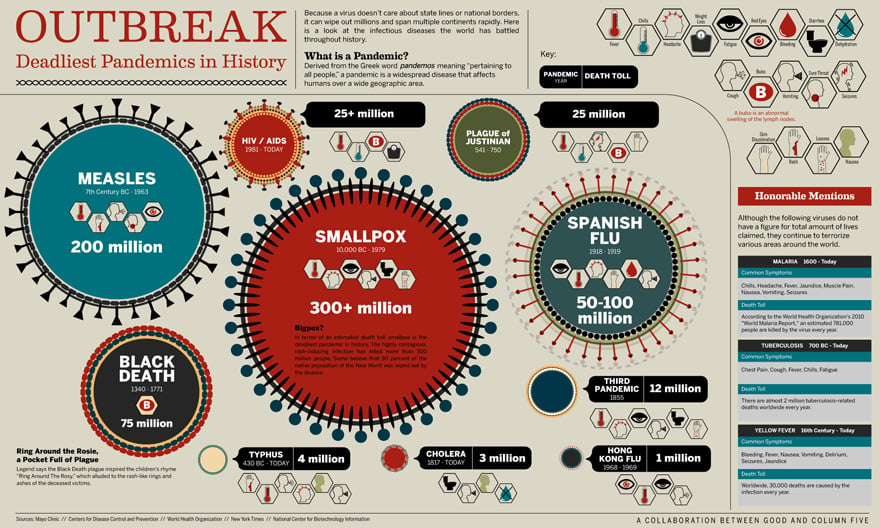
An upcoming science class will be working on a presentation this week on The Plague.
Here are some example that I will show the class:
Prezi

Powtoon

Infographic - (example http://piktochart.com)


Sunday, September 7, 2014

Getting Started with Google Classroom (and Grading)

Google Classroom  has been released and so far the results are good!

I have been able to easily how teachers how to go to classroom.google.com, join as a teacher and create a class. I had a preview over the summer with a few teachers but not really able to check it out until this week in school with several classes.  I am impressed with how easily and seamlessly it integrates into Google Drive by creating a Class Folder with each course students are invited to by teachers.  When showing students the new icon under the Apps Menu and the link classroom.google.com. I had them join as students, provided them the class code.

We started with a basic exercise posting a question "Tell me something about yourself" as an assignment with a due date.  The questions appeared on the student class site.  Students created a google doc, responded and simply click the turn in option.  The teacher was delight to see the list of students, with links to their email and view what students had turned the assignment in.  We quickly assigned points for the day for the assignment.

I then posted a YouTube video  link with an overview. of Classroom.

I then had students access their Google Drive and locate the Classroom Folder and assignments. A few of students had already activated other classes and had could see three of their classrooms.  The interface and process is very easy to use.

Now, I only wish Google would streamline some other options such as grading without having to use Add-On's.  I wouldn't be surprised to see more classroom features integrated this year.  The timing is great, teachers are looking for a way to streamline their work and Google just gave it to them.

I tweet out some benefits of Google Classroom over the weekend and plan to meet with more teachers next week.

launch, product updates, and more. Our August Newsletter is out. http://goo.gl/5m8rrl  pic.twitter.com/MxrxwAc7tL Retweeted by mmarotta

Featured Launch: Google Classroom


Back to school and new options 3 Different Things You Can Do With - via @Edudemic http://bit.ly/1p6UnPi

I worked with a few teachers to use Google Forms with the Flubaroo
Add-On to create Pre-Post tests for our DDM's.
I also provided them the link to my blog post along with the video below.

Next Month -  We will explore using Google Classroom with Doctopus and Goobric (Andrew Stillman has updated for classroom here) for online grading with a rubric.
Or watch this review Doctopus + Classroom + Goobric = :) youtu.be/r0NXeDKPyls
http:// 
by here by Jen Magiera

These enhancements and direct usefulness in the classroom should have more teachers embracing #GAFE with these new features!


Monday, August 18, 2014

Planning for the new school year

We will be returning to school on Monday August 25th.  Prior to returning to school we are reviewing
- Atlas Rubicon (Nashoba) for our upcoming opening day along with Understanding by Design.

Blogs and Videos to Share
  • Digital Integration in the Classroom | Mike Fisher [ more info ]
  • Digital Tools to Upgrade Your PD | Ann Johnson [ more info ]
Understanding by Design (by Grant Wiggins  and Jay McTighe
Book   (and internal / copy)


Optional Resources
- Video)

Technology Integration Essential Questions (examples)
Multimedia Examples

Sunday, July 27, 2014

Summer 2014 - Professional Development Workshops and Graduate Classes

This month I delivered two workshops on iPad and Google Apps for Education and the two one week graduate classes on the following:
  1. Transforming Learning to Promote Collaboration and Efficiency with Google Apps for Education (GAFE)
  2. iPad for Educators
The more I use GAFE/Google Drive with the iPad's and stress workflow, the more I realize how easy it is to share information with students. I am delighted the CMRC Grant will cover more workshops next month due to the high demand for the offerings.

I have started to explore Google Classroom but I am limited to exploring only with teachers within my school district.  Next month I will be delivering another iPad class and three workshops on iPads, GAFE and Multimedia/Blogging.

I am so impressed with colleagues within my district and the many fine educators I had the chance to work with this month.


Now, I am ready to unplug for a few weeks and enjoy my summer!

Thursday, June 26, 2014

Workshops/Free on GAFE and iPads this summer (June and August 2014)

A few days of rest this week and two (7/25 iPad and 7/26 GAFE) great PD Workshops that sold out!
I will be offering again at the end of August for the Central MA Readiness Center (Early Learning Challenge Grant)
  1. Introduction to Integrating iPads in the Early Childhood and Elementary Classroom Added Date  August 19th, Tuesday - Johnny Appleseed Elementary School, Leominster, MA, 8:00 am – 4:00 pm
  2. Google Apps for Educators (GAFE) New date added August 20th  Wednesday
    Johnny Appleseed Elementary School, Leominster, MA 8:00 am – 4:00 pm
  3. Multimedia - Publishing and Blogging August 21st -  Thursday
More details on the CMRS website 
http://www.fitchburgstate.edu/offices/community-outreach/central-mass-readiness-center/professional-development-across-the-region/ 

So many talented teachers.  We had a great few days of learning and collaborating!
Teachers now want additional sessions on Blogging, iMove/iPad and YouTube.

I get to rest up for the next few weeks and will be teaching a few weeks in July on both topics.

For details about the FREE workshops contact:
Central MA Readiness Center (Early Learning Challenge Grant) Debbie Fnine dfnine@fitchburgstate.edu 978 665-4162